React Native 0.87 - Strict TypeScript API, Metro Update, Swift Package Manager, AGP 9 Support


Today we are excited to release React Native 0.87!
This release makes the Strict TypeScript API the default JavaScript API, updates Metro to 0.87, adds experimental support for Swift Package Manager (SwiftPM). It also raises the minimum toolchain requirements: Node.js 22, Android Gradle Plugin 9, and Kotlin 2.0+.
Highlights
- Strict TypeScript API by default
- Faster, leaner Metro
- Experimental Swift Package Manager support for iOS
- Android Gradle Plugin (AGP) v9
Highlights
Strict TypeScript API by default
React Native's public JavaScript API is now the Strict TypeScript API. This was originally available as an opt-in preview in 0.80, alongside the deprecation of deep imports. In 0.87, it becomes the default for all projects.
This is an ecosystem-wide change and brings intentional breaking changes across the API surface. The payoff:
- Types you can trust: Types are now generated directly from React Native's source code, replacing the hand-maintained definitions we shipped previously. This removes long-standing drift between the types and the code, with improved coverage and accuracy across the entire API.
- A stable API: A stable API starts with defining exactly what it covers. The API is now scoped to what
react-nativeexports at its root, so our internal file changes are no longer your breaking changes. From 0.87, React Native's JS API changes only when we intend it to.
Here are the new types in action — hovering the TextInput component:
| Before (legacy types) | After (Strict API) |
|---|---|
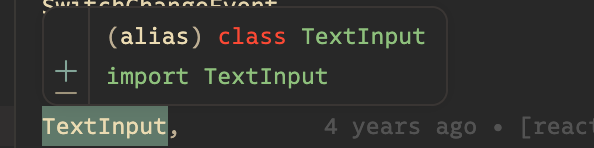 | 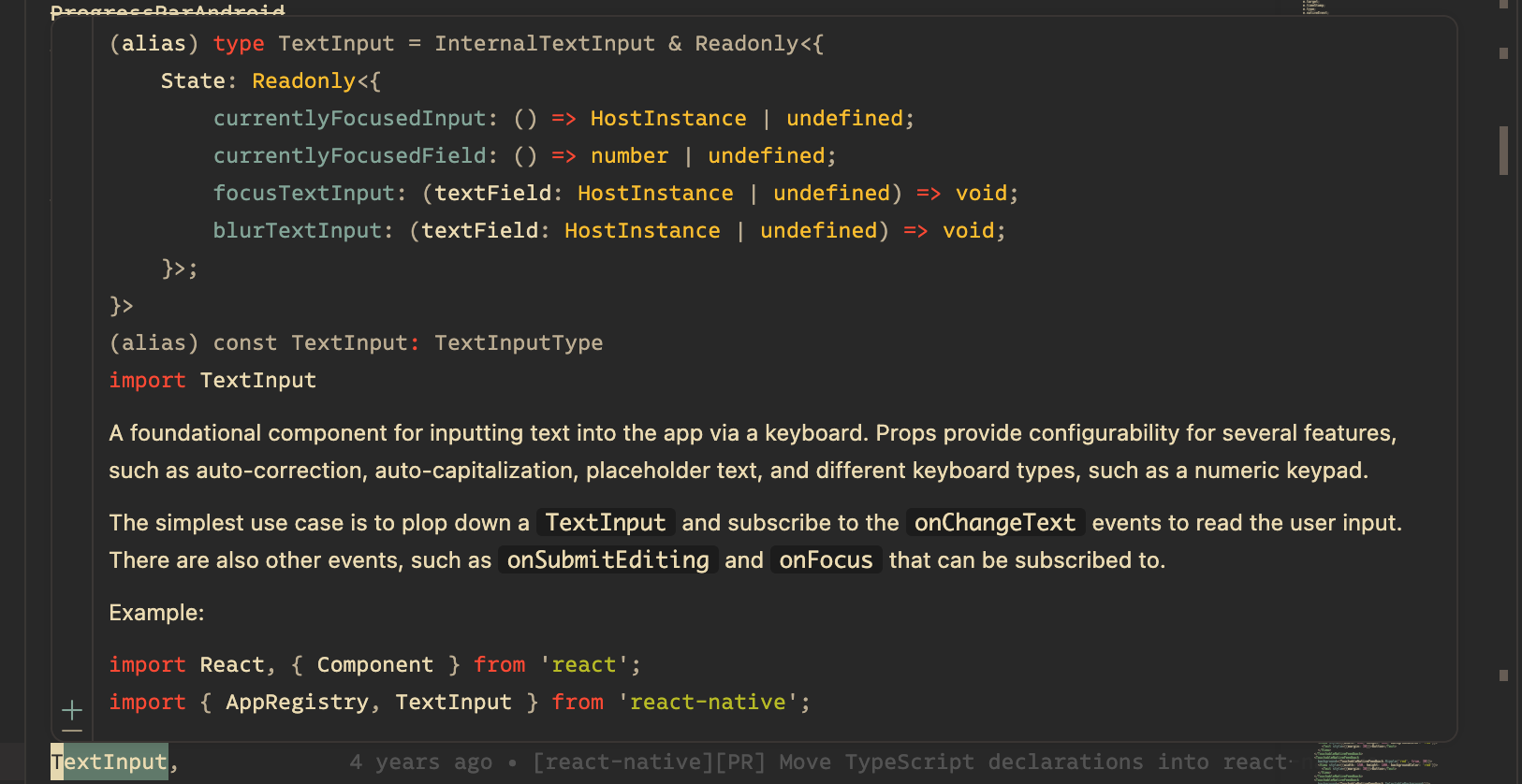 |
Doc comments are now included on most symbols, providing better glanceable information on hover.
Breaking changes
- Deep imports into internal paths (e.g.
react-native/Libraries/*) are now a type error, and must be migrated. - Some types names and shapes have been updated where the legacy definitions were inaccurate or misaligned — most visibly, refs now have dedicated types (e.g
ViewInstance,TextInputInstance) (docs).
Since the original 0.80 preview, we've worked with the community and partners to refine our API — finalizing root exports and resolving incompatibilities with popular libraries.
Many apps should be able to upgrade to 0.87 with few or no errors. The migration guide covers each breaking change.
Agent-driven upgrades can make use of the /migrate-to-strict-api skill, which contains direct migration instructions on top of our existing ESLint fixers.
Opting out
We understand that not every app or library will be able to migrate right away — with this in mind, we're maintaining a user opt-out switch.
The opt-out is a temporary bridge: it remains available through React Native 0.88, and we intend to remove the legacy TypeScript types in the following release.
Strict API: Opting out
To temporarily revert to the previous types, add the "react-native-legacy-deep-imports" custom condition to your tsconfig.json:
  {
    "extends": "@react-native/typescript-config",
    "compilerOptions": {
      ...
+     "customConditions": ["react-native", "react-native-legacy-deep-imports"]
    }
  }
- Opting out affects TypeScript analysis in your own project only — apps and libraries migrate independently (more details).
- If something is blocking you from adopting the Strict API, please let us know in our feedback thread.
Strict API: Further reading and FAQs
- FAQs — answers to common questions, including whether this affects runtime, library authors' migration timing, and why the manual types were replaced.
- Moving Towards a Stable JavaScript API — our original rationale for this migration, from the 0.80 preview announcement.
- Watch the talk — a deep dive into our motivations and the work behind the Strict TypeScript API, from App.js 2025.
Faster, leaner Metro
Metro is updated from 0.84 to 0.87 for this release.
- Source map generation is now 2x faster, for faster React Native DevTools loads.
- Metro uses half as much memory, thanks to more efficient source map storage.
- Stable support for TypeScript and ESM config files, e.g.
metro.config.mts, dropped support for.es6extensions and YAML configs. - New resolver features including package self-resolve.
- Various fixes and improvements, see Metro’s release notes.
Experimental Swift Package Manager support for iOS
React Native 0.87 adds experimental support for Swift Package Manager as an alternative to CocoaPods on iOS. It is opt-in and additive; CocoaPods remains the default and the supported path. The SwiftPM path consumes the same prebuilt XCFrameworks React Native already publishes.
This new setup only needs Xcode — no Ruby, no Bundler, no CocoaPods.
To try it in an existing/new app:
cd ios
# deintegrate will remove CocoaPods from your project
npx react-native spm -- deintegrate
The command injects Swift package references into your existing .xcodeproj instead of replacing the project. Your signing, capabilities, and build phases stay untouched. npx react-native spm deinit reverses the change exactly.
You only run that command once. After the first setup, you do not run it again when your dependencies change. Install or remove a native package, then build. The project detects the change and re-runs autolinking for you. There is no pod install step to remember after every dependency change.
Known limitations:
- A community library must ship a
Package.swift. If one does not, runnpx react-native spm scaffoldto generate it from the library's podspec. - After a fresh clone, and in CI, run
npx react-native spmonce before building. It is the analog ofpod install. - The commands, flags, and generated layout may change in later releases. Do not use it in production yet.
See RFC #0994 for the full design and migration plan.
Headers Breaking Changes
To properly support SwiftPM integration with React Native, we had to rethink how we ship the precompiled binaries of React Native itself. This is needed because SwiftPM is much stricter than Cocoapods when it comes to XCFramework structure and headers location.
You might notice a couple of new XCFrameworks:
ReactNativeHeaders.xcframeworkReactNativeDependenciesHeaders.xcframework
These are Headers only frameworks and thanks to this change headers now resolve through standard framework and header search path mechanics, and every namespace has exactly one physical home. Header content is byte-identical to the source pods. The one consumer-facing change is bare-form angle includes — if you import a React Native header without its namespace, add it:
- #import <RCTAppDelegate.h>
+ #import <React/RCTAppDelegate.h>
Android Gradle Plugin (AGP) v9
This is the first release of React Native that adds support for AGP 9.
AGP 9.0 is a major release of AGP that brings several API and breaking changes in Gradle builds.
Particularly, in this release the recommendation is to opt-out of built-in Kotlin and the new DSL API from AGP 9. You can do so by adding those flags in your android/gradle.properties files, as suggested also in the upgrade helper:
# Opt out of built-in kotlin and new DSL behavior that ships with AGP 9.
# Starting from AGP 10.x these opt outs will be removed.
android.builtInKotlin=false
android.newDsl=false
You can follow the progress on the ecosystem wide adoption of AGP 9 in RFC #1006
Breaking Changes
Minimum toolchain requirements
- Node.js >= 22.13.0 is now required.
- Android: Minimum Kotlin version is now 2.0+ (bundled Kotlin version is 2.2.0).
- Android:
minCompileSdkis now 34 (libraries must target compileSdk >= 34); - Android:
compileSdk/buildToolswas bumped to 37.
API removals
- The Strict TypeScript API is now the default (see Highlights) — deep imports into
Libraries/are inaccessible unless opting back via"react-native-legacy-deep-imports"(details). - Deep imports to
src/private/are removed. - The deprecated
*Propertiestype aliases (e.g.ViewProperties) are inaccessible under the Strict API — use the*Propsequivalents (details). - Support for YAML Metro config files, and JavaScript config files with
.es6extensions, has been removed. - Removed
InteractionManager— userequestIdleCallbackinstead. - Removed the deprecated
Modalanimatedprop. - Removed deprecated
StatusBarbackgroundColor/translucent/networkActivityIndicatorVisibleprops and their setter methods. - Removed boolean-value support for
ScrollViewkeyboardShouldPersistTaps. - Removed the
useTurboModulesfeature flag (TurboModules are always enabled). useColorScheme()now returnsColorSchemeName | nulland no longer returns'unspecified'.- Removed the
NativeDialogManagerAndroidexport and the (undocumented)Touchableroot export — extendViewPropsinstead. - Removed
NativeMethods/NativeMethodsMixintypes (useHostInstance).
Packages & tooling
@react-native/core-cli-utilsis no longer published (still available in-repo as a reference implementation).react-native/rn-get-polyfillsis removed — use@react-native/js-polyfills.@react-native/jest-presetmust now be consumed as a package.- Removed support for connecting to the standalone
react-devtoolspackage via WebSocket — use React Native DevTools instead.
Deprecations
The following APIs are deprecated and due for removal in a future release:
react-native/Libraries/Core/InitializeCore→ usereact-native/setup-env(details).@react-native/assets-registry→ useAssetRegistryfromreact-nativeand the new@react-native/asset-utils.ImageBackground→ use aViewwith an absolutely positionedImage.NativeMethodsinterface → useHostInstance.Appearance.setColorScheme('unspecified')→ use'auto'.- Android:
DrawerLayoutAndroid→ usereact-native-drawer-layout;UIBlock/UIManagerModule.addUIBlock/prependUIBlock→ useUIManagerListeneror View Commands; the new-arch-flag constructors onDefaultReactActivityDelegate. - iOS:
TimingModule;RCTTurboModuleEnabled()/RCTEnableTurboModule().
Acknowledgements
React Native 0.87 contains 265 commits from 74 contributors. Thanks for all your hard work!
We want to send a special thank you to those community members that shipped significant contributions in this release.
- Alex Hunt for work on the Strict TypeScript API
- Christian Falch for adding the support for Swift Package Manager
- Rob Hogan for improvements to Metro
- Hur Ali for AGP V9 adoption
- Christoph Purrer for legacy architecture cleanup
Upgrade to 0.87
0.87 is now the latest stable version of React Native and 0.84.x moves to unsupported. For more information see React Native's support policy.
Upgrading
Please use the React Native Upgrade Helper to view code changes between React Native versions for existing projects, in addition to the Upgrading docs.
Create a new project
npx @react-native-community/cli@latest init MyProject --version latest
Expo
For Expo projects, React Native 0.87 will be available as part of the expo@canary releases.